> For the complete documentation index, see [llms.txt](https://hotro.lovinbot.ai/wiki/llms.txt). Markdown versions of documentation pages are available by appending `.md` to page URLs; this page is available as [Markdown](https://hotro.lovinbot.ai/wiki/bothive-ho-tro-or-lovinbot/tinh-nang-chinh/ai-membership/tuy-chinh-bang-gia-ai-membership.md).

# Tùy chỉnh bảng giá AI Membership

## 1. Đăng Nhập và Tùy Chỉnh AI Membership

Truy cập vào[ app.lovinbot.ai](http://app.lovinbot.ai) và đăng nhập vào tài khoản của bạn.

<figure><img src="/files/stUDGCErWmeJKT1A2yMO" alt=""><figcaption></figcaption></figure>

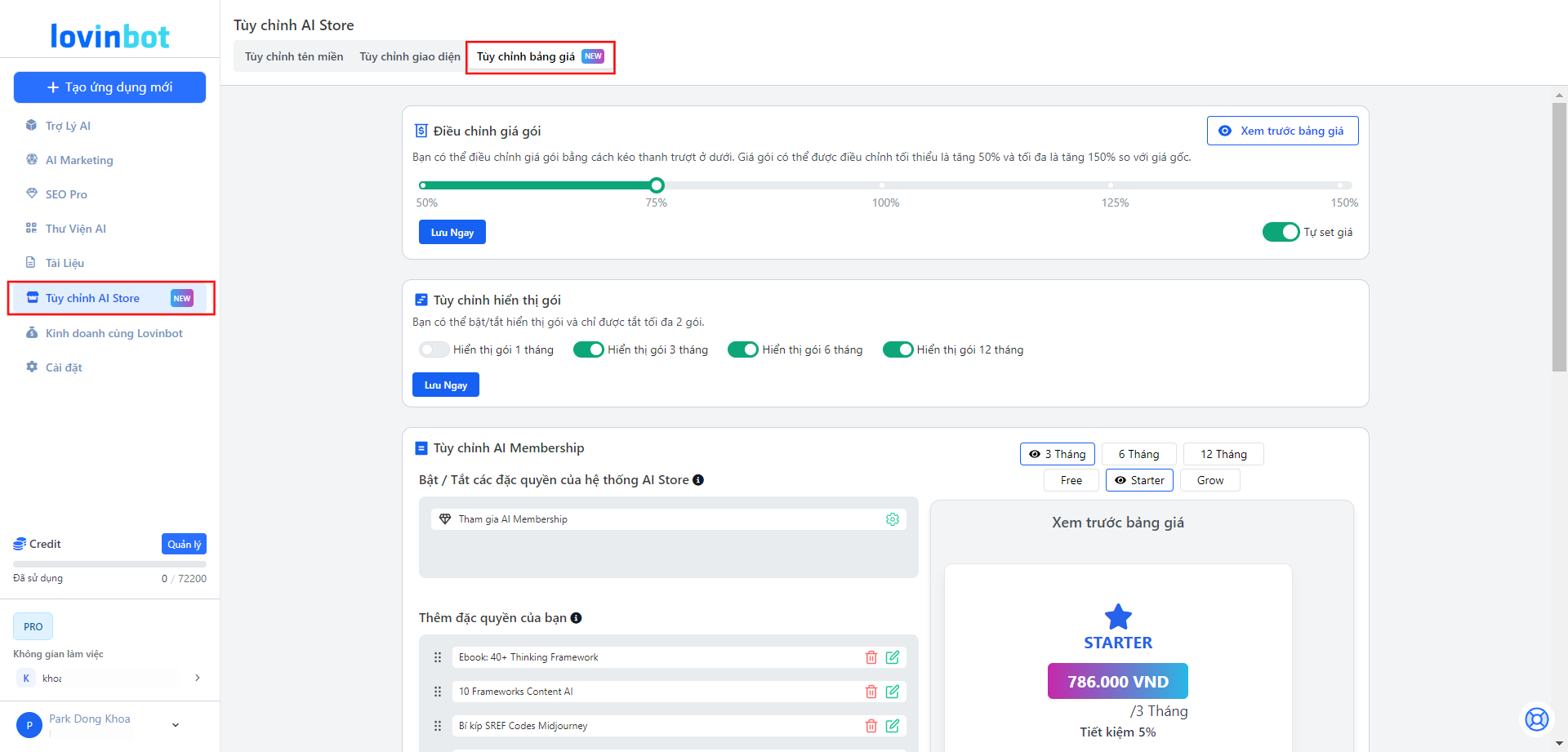
Sau khi đăng nhập, điều hướng đến mục "**Tùy chỉnh AI Store**" -> Chọn "**Tùy chỉnh bảng giá**".&#x20;

***

## 2. Điều Chỉnh Giá Gói Ở AI Store

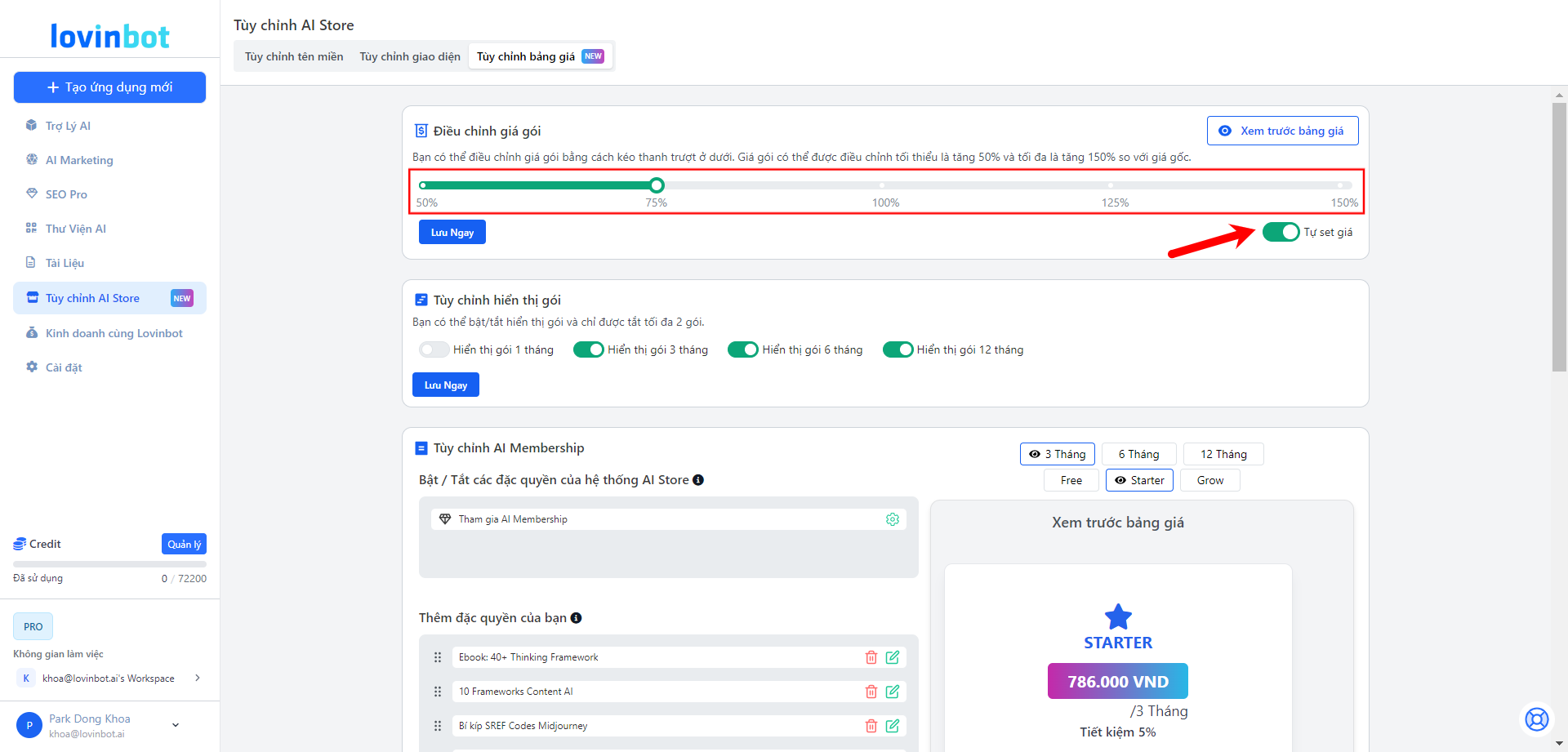
**Mở Chức Năng "Tự Set Giá"**

<figure><img src="/files/Z2iMsstxnFmEofrFv7ve" alt=""><figcaption></figcaption></figure>

* Chọn chức năng "Tự set giá" để điều chỉnh giá các gói.
* Sử dụng thanh trượt để điều chỉnh giá gói từ 50% đến 150% so với giá gốc.
* Nhấn "Lưu ngay" để lưu thay đổi và **"Xem trước bảng giá"** để kiểm tra các gói đã điều chỉnh.

Ví dụ:&#x20;

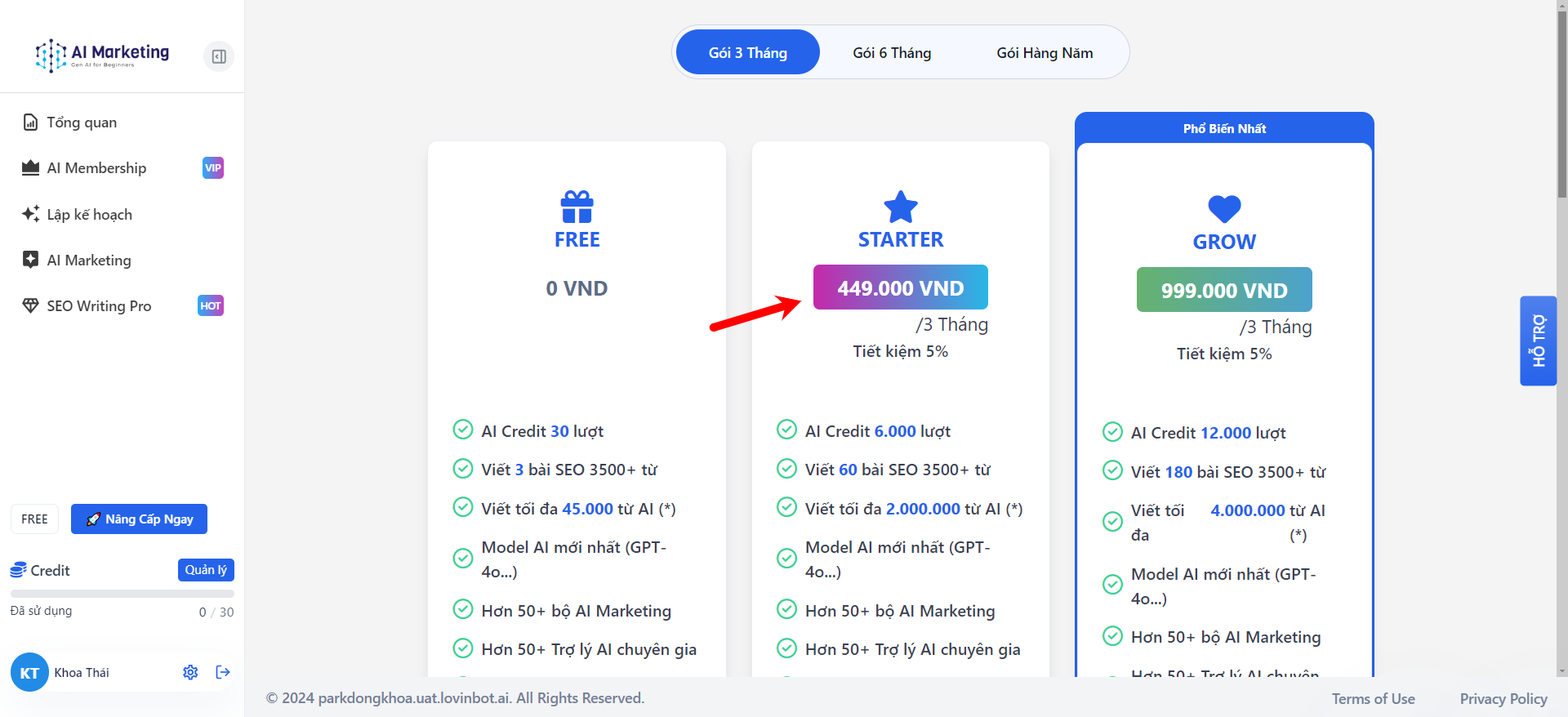
Giá mặc định | **Gói 3 Tháng -** STARTER (449.000 VND)

<figure><img src="/files/nsPt0wNcC1rKUhoEHoKA" alt=""><figcaption><p>Bảng giá ở AI Store - Giá mặc định từ hệ thống</p></figcaption></figure>

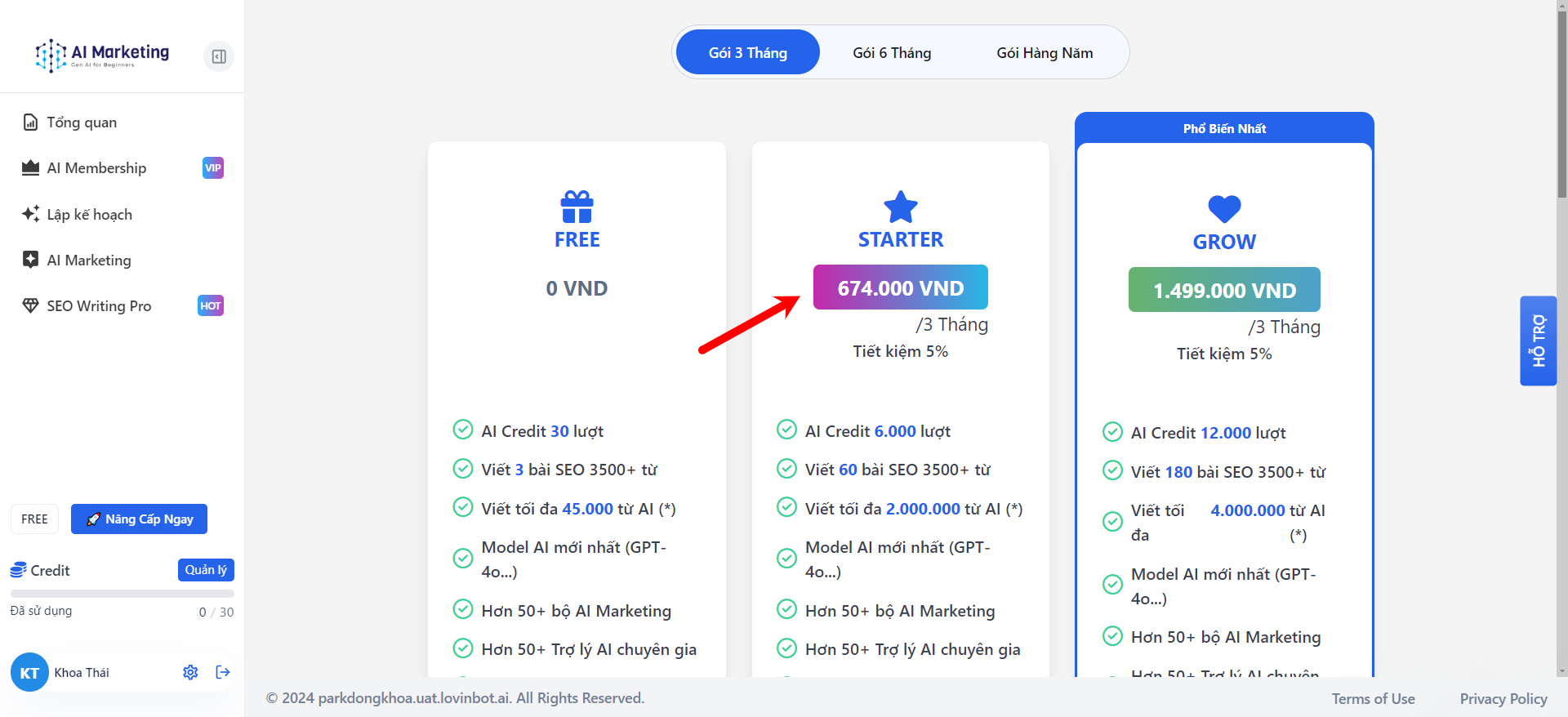
Giá tăng 75% | **Gói 3 Tháng -** STARTER **(786.000 VND)**

<figure><img src="/files/jifKDZeWGM1HBQTaMYbG" alt=""><figcaption><p>Bảng giá ở AI Store - Giá đã tăng 75%</p></figcaption></figure>

*<mark style="background-color:yellow;">**Lưu ý:**</mark> <mark style="background-color:yellow;"></mark><mark style="background-color:yellow;">Chỉ nên chọn các mức tăng cố định như 50%, 75%, 100%,...</mark>*

***

## 3. Tùy Chỉnh Hiển Thị Các Gói

**Bật/Tắt Gói Thời Hạn**

Bạn có thể lựa chọn bật/tắt các gói như 01 tháng, 03 tháng, 06 tháng hoặc 12 tháng.

<figure><img src="/files/eKfVLyPzRBheufvNzDWj" alt=""><figcaption></figcaption></figure>

1. **Bước 1:** Lựa chọn gói phù hợp để hiển thị theo chiến lược kinh doanh bằng cách nhấn vào biểu tượng bật/tắt. (Bắt buộc **hiển thị tối đa 2 gói**)
2. **Bước 2:** Nhấn **"Lưu ngay"** để lưu tùy chỉnh.

**Ví dụ:** Tắt gói 1 tháng thì các gói còn lại sẽ hiển thị như 3 tháng, 6 tháng, 12 tháng.

<figure><img src="https://lh7-rt.googleusercontent.com/docsz/AD_4nXcAoqpMAF4V5M0IKgjgMycqFsCzMxAkKcmIcv4wIeOSrS0uQDggFFYzZFXwBhyIFzqLv48QxSpbVFNFvR4O99yEPJgUZRJd-hbBR-MjTY1NPEMP0vH7TnzY30cnq-yX6qO7Y6JU_Zzx-3reRCaZNSUbr4_-?key=sIQS8jfyojSA06TwBYUxng" alt=""><figcaption><p>Giao diện trong AI HUB</p></figcaption></figure>

<figure><img src="https://lh7-rt.googleusercontent.com/docsz/AD_4nXdYccqMJVNLGLVTeYmCzk2B0RQx8hNo_P-Uw-5HDFBgUtEXs-Zp7RKYmRjUa0frbsShoodGjti66UIYl2D3V1N2i5mVeOYd0-wxU9spFLXQc4eeYIw-E21mocGPPDLowI00X0m81J5IF-nRDcx2J-2w0lFk?key=sIQS8jfyojSA06TwBYUxng" alt=""><figcaption><p>Giao diện bảng giá hiển thị trong AI STORE (Đã tắt gói 1 tháng)</p></figcaption></figure>

***

## 4. Tùy Chỉnh Đặc Quyền AI Membership

<figure><img src="https://lh7-rt.googleusercontent.com/docsz/AD_4nXeOZTZW32qr3Bl4D3Yru6zZiU6GK-0UTfC2R0u0Ngoo7uioV-HPX6KIzTA9EDrzL1rs81HDhNuvuJ7JmyathIhqlY6m6VrSjIfoATe2yfv3Y1ExCLv1dC0qh15_2SD71mQe71HBYK5tS84JfS3m8RI5epVI?key=sIQS8jfyojSA06TwBYUxng" alt=""><figcaption></figcaption></figure>

### PHẦN 1: Bật/Tắt Đặc Quyền AI Member

Chọn các gói sẽ có Đặc Quyền AI Member, ví dụ: **gói 6 tháng và 12 tháng (Starter, Grow).**

**Bước 1:** Nhấn vào biểu tượng "bánh răng" và chọn mục kích hoạt trong các gói.

<figure><img src="https://lh7-rt.googleusercontent.com/docsz/AD_4nXdmm-r45qk4mltwYgwf-um9zhK59mduQKypl46WeTRAwxOyrd52uNn4HP5mE7VLMBRe_w_1s59ktSf6JpxbSjCPOVBu5eN5jaQEJH3rgsYQYwaJfm8BsQZgGiUEAVj_xMyLTM7cNdZemCPkr2vVYR6W8As?key=sIQS8jfyojSA06TwBYUxng" alt=""><figcaption><p>Bật Đặc Quyền AI Member cho gói 6 tháng, 12 tháng ( Starter, Grow)</p></figcaption></figure>

**Bước 2:** Nhấn "Lưu ngay" để lưu lại lựa chọn.

<figure><img src="https://lh7-rt.googleusercontent.com/docsz/AD_4nXfQYWmUXO6YbQhlnVHdkRS1dF9WHWldsoCIyQu0WrqlyDnQ0U979kPPl8fyDoOr7nfkSzwHouBKaE9GSAkH8ZW24z6P4LmkYoyRO-isIcgE1NDMr99NU5MTES-GqW-SqadZ1F9Ybh31_W7IWLsBPGi8fZ68?key=sIQS8jfyojSA06TwBYUxng" alt=""><figcaption><p>Bảng giá tại AI Store - Gói 3 tháng không có Đặc Quyền AI Member </p></figcaption></figure>

<figure><img src="https://lh7-rt.googleusercontent.com/docsz/AD_4nXdaBG8lDF4qtHliN8BG43Epx5LU3rSv8KEsAI53zoVY_OOXMnUulI6ptrYHB3pBL7VpTM4vSo9MHae-lylb5bDaJ72kw0EFF8w1J3QZn521nGOP_-bvbd051PqqWnC9f1vipF7GreQTBPFTNiTh7HdUwJUm?key=sIQS8jfyojSA06TwBYUxng" alt=""><figcaption><p>Bảng giá tại AI Store - Gói 6 tháng có Đặc Quyền AI Member </p></figcaption></figure>

*<mark style="background-color:yellow;">**Gợi ý:**</mark> <mark style="background-color:yellow;"></mark><mark style="background-color:yellow;">Nên kích hoạt đặc quyền cho các gói có thời gian >3 tháng để tối ưu doanh thu.</mark>*

### PHẦN 2: Thêm Mới Các Đặc Quyền

<figure><img src="https://lh7-rt.googleusercontent.com/docsz/AD_4nXd1hRACfuhIwkSuLz6EZnWWtAq_OI7ZE3wmBtouqQ5UWgsaum9xx1TKMwyKroY9GcUoq9P5-7Nt5HjldFuW1svaWkTOHfbKtu0pSa7MyhUyItc8TtJ0iT5iyHCV8lor4y6LkVlMF-tpxOnSaYiaMmrSfKc?key=sIQS8jfyojSA06TwBYUxng" alt=""><figcaption></figcaption></figure>

**Bước 1:** Nhấn "+ Thêm mới" để nhập thông tin mô tả đặc quyền.

<figure><img src="https://lh7-rt.googleusercontent.com/docsz/AD_4nXdwvJBzuZzlzCHGZ7ncnxDw1ImRGZ4skhTeF51X6cXQrTyDEbFN-t9qCC0Y5iinoZdOuL3z3sxejRhifX7z0fEkb4SgyQNCCC3MrR3rMTOVxH-k3eV18qMVa6H2O5NZVMNukzuYXwbtCjlg2U0gwzXY1Q2v?key=sIQS8jfyojSA06TwBYUxng" alt=""><figcaption></figcaption></figure>

**Bước 2:** Nhấn "Lưu ngay" để hoàn tất.

**Ví dụ:**

* Tham gia cộng đồng chuyên sâu
* Được tham gia các khóa học chuyên sâu
* Nhận được ebook độc quyền

( Những đặc quyền trên sẽ được cấu hình trực tiếp tại AI Store của bạn với vai trò là Admin: **Xem hướng dẫn tạo các đặc quyền)**

***

***


---

# Agent Instructions
This documentation is published with GitBook. GitBook is the documentation platform designed so that both humans and AI agents can read, navigate, and reason over technical content effectively. Learn more at gitbook.com.

## Querying This Documentation
If you need additional information that is not directly available in this page, you can query the documentation dynamically by asking a question.

Perform an HTTP GET request on the current page URL with the `ask` query parameter, and the optional `goal` query parameter:

```
GET https://hotro.lovinbot.ai/wiki/bothive-ho-tro-or-lovinbot/tinh-nang-chinh/ai-membership/tuy-chinh-bang-gia-ai-membership.md?ask=<question>&goal=<endgoal>
```

`ask` is the immediate question: it should be specific, self-contained, and written in natural language.
`goal` is optional and describes the broader end goal you are ultimately trying to accomplish on behalf of the user. GitBook uses it to tailor the answer towards what is most useful for that goal.

The response will contain a direct answer to the question and relevant excerpts and sources from the documentation.

Use this mechanism when the answer is not explicitly present in the current page, you need clarification or additional context, or you want to retrieve related documentation sections.